
This is a multi part lesson where the same code is reused with addions and a few subtractions. The beak is the a single light at the front or nose of the Finch.
| Block Code | Text Code for Copy and Paste |
Notes |
Beak1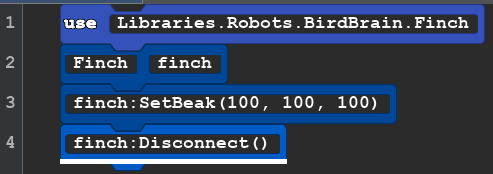 |
use Libraries.Robots.BirdBrain.Finch Finch finch finch:SetBeak(100, 100, 100) finch:Disconnect() |
Color Parameters
|
Beak2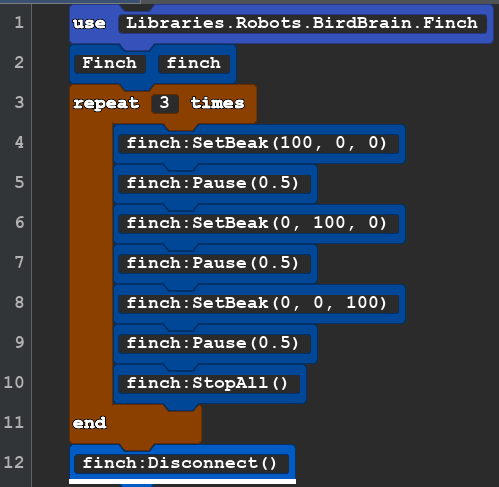 |
use Libraries.Robots.BirdBrain.Finch Finch finch repeat 3 times finch:SetBeak(100, 0, 0) finch:Pause(0.5) finch:SetBeak(0, 100, 0) finch:Pause(0.5) finch:SetBeak(0, 0, 100) finch:Pause(0.5) finch:StopAll() end finch:Disconnect() |
This code makes the beak blink Red, Green, Blue. Explore what other light effects you can create.
|
Beak3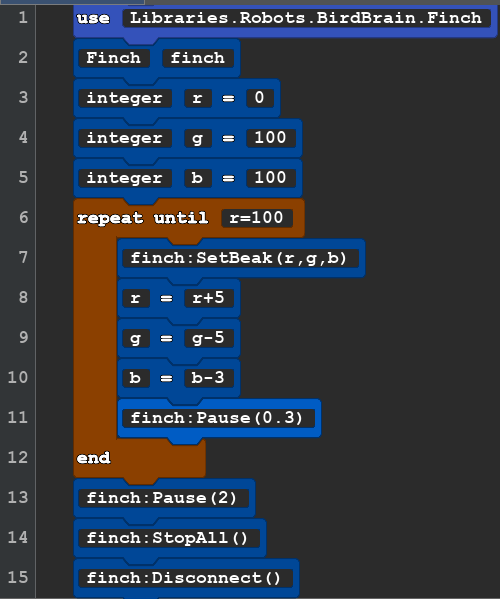 |
use Libraries.Robots.BirdBrain.Finch Finch finch integer r=0 integer g=100 integer b =100 repeat until r=100 finch:SetBeak(r,g,b) r=r+5 g=g-5 b=b-3 finch:Pause(0.3) end finch:Pause(2) finch:StopAll() finch:Disconnect() |
New: we are creating integers that change by addition and subtraction while the program runs. At the start red (r) is zero green (g) and blue (b) are 100. Then we create a loop that repeats until r = 100. Once r is 100 it skips down to the end and does the remain code. Each we loop we add 5 to r, subtract 5 from g, and subtract 3 from b. Feel free to change up the code to make a beak light show. REMEMBER: r,g,b must be a whole number between 0 and 100. If you change the formulas and it create a a number that less than 0 or greater than 100 it will fail! |
Table of ColorCodes(X,X,X)
Colors with text names (Wikipedia)