
Here is the code and lesson plans for Unit one, Part 1
| Picture of Block View | Copy and Paste Code |
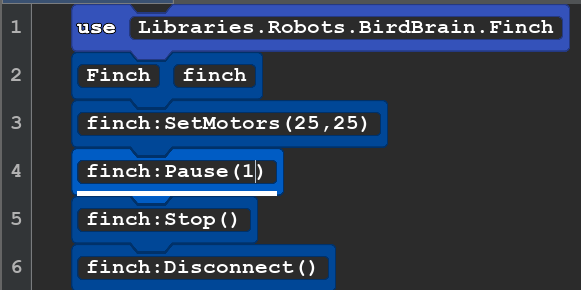 |
use Libraries.Robots.BirdBrain.Finch |
Whats Happening?
Line 1: All the information the computer and robot needs know to about how do robot things live in this library.
Line 2: We need a name to use to tell the computer we want it to do something with the robot. We choose "finch."
Line 3: finch tell the computer we are talking to the robot. SetMotors sets the speed for the left and right wheel.
100 is the fastest. Negative numbers make the robot go backwards.
Line 4: Pause gives a time for the robot to move. (1) is one second. This is a number so it could be (0.1) or to pause for a tenth of second or (2) would let it move for 2 seconds.
Line 5: Stop() This tells the robot to turn off the motors.
Line 6: The tells the computer and robot that you are done with the robot.
Explore: See what happens when you change the numbers in lines 3 and 4. Warning: if you make the pause too long you will be chasing your robot! 5 is a good limit on a table. 10 on the floor. Remember to try some negative numbers for line 3 and try numbers that are different for the left and right motors.
Next Lesson: Lesson B2 Turning