
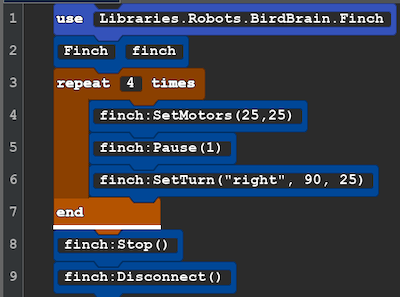
Some time will will want to make the robot repeat actions. These are loops and you need to be sure to END the loop.
| Block Code | Text Code for Copy and Paste |
 |
use Libraries.Robots.BirdBrain.Finch Finch finch repeat 4 times finch:SetMotors(25,25) finch:Pause(1) finch:SetTurn("right", 90, 25) end finch:Stop() finch:Disconnect() |
New!
Line 3: Tell the robot how many times you want to repeat the following actions. They type of code is a control. This control makes a loop that will end. This is different type of number called an integer. Integers are whole numbers with a decimal or fraction. 1, 5, and 10 are integers. In this case a negative value is not possible, but integer do include 0 a nd negative values.
Line 7: end, this is where the repeat stops once it has reach the integer above is reached and then it move on to the lines after the end.
Explore: In the SetTurn action the integer 90 tell the number of degrees you want robot to turn in place. Try other integers and see what shapes it makes! You may need to change the number of repeats to complete a shape.
Challenge: What number of degrees and repeats do you need to make a triangle? (Challenge Hints and Answers)
Next Lesson : Lesson B4 Draw Shapes