
We encourage you to reuse the B1 Moving Code you and Just a a few new lines to move forward this these B1 Lessons
| Block Code Picture | Copy and Paste Code |
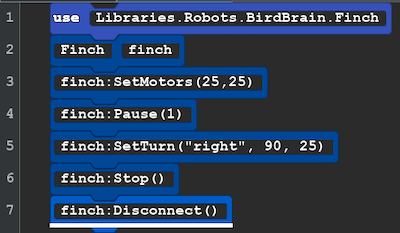 |
use Libraries.Robots.BirdBrain.Finch Finch finch finch:SetMotors(25,25) finch:Pause(1) finch:SetTurn("right", 90, 25) finch:Stop() finch:Disconnect() |
Line 5: SetTurn( can be "right" or "left", then number of degrees to turn, and the motor speed
New Idea After the code finch: what we find are actions, they tell the robot to do something. Inside the parentheses () are the parameters. Sometimes parameters are not needed such as finch:Disconnect(). Sometimes they are text like "right" and are enclosed in double quote marks and other times they can be intergers and numbers like 90 or 1 or 0.25.
Explore: Try changing the numbers in Lines 3 and 5. See what happens. Change the text "right" to "left". If you want to change line 4 you would use a number like .5 for a smaller movement 2 for a longer movement.
Save this code, you will reuse it in lesson B3.
Next Lesson: Lesson B3 Make a Shape