
Add Lights and Sound while you make the Robot move.
- OM1 Forward and Back with Lights
- OM2 Add speech the OM1
- OM3 Make a Circle
- OM4 Speed Test
- OM5 Spiral Challenge
- OM6 Square Spiral Challenge
Now you know something about motors and lights let give you a challenge that uses those actions in a loop.
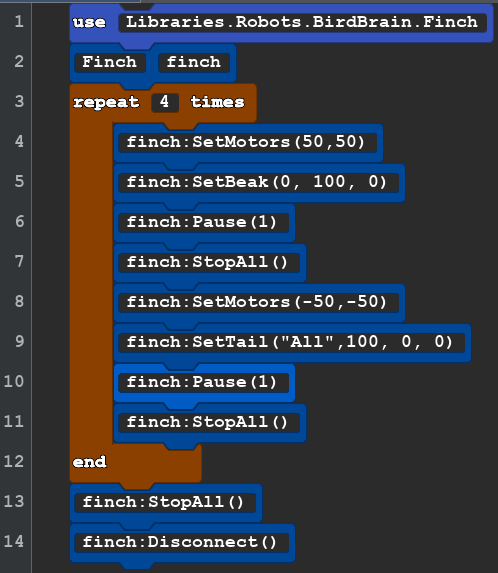
Task :Make the robot move forward and back 4 times. When the robot moves forward make the Beak Light Green, When moves backward make the tail lights Red. Remember to turn off the light when you are ready to got the other direction.
One possible solution is below but try it on your own first.
| OM1 Motor and Lights | Text Code for Copy and Paste | Notes |
 |
use Libraries.Robots.BirdBrain.Finch Finch finch repeat 4 times finch:SetMotors(50,50) finch:SetBeak(0, 100, 0) finch:Pause(1) finch:StopAll() finch:SetMotors(-50,-50) finch:SetTail("All",100, 0, 0) finch:Pause(1) finch:StopAll() end finch:StopAll() finch:Disconnect() |
Is your code different or the the same as the sample? If does what we asked the robot to do, then it is a successful code. Our code was 14 lines long. It is possible to do this task in 13 lines. Which line do you think was unneeded? (Line 13, we had already stopped everything in in the last repeat of line 11!) As a computer programer we want our code to be no more complicated than it needs to be. |
| OM2MotorSpeech | Text Code for Copy and Paste | Notes |
 |
use Libraries.Robots.BirdBrain.Finch Finch finch repeat 4 times say "Forward" finch:SetMotors(50,50) finch:SetBeak(0, 100, 0) finch:Pause(1) finch:StopAll() say "BACK" finch:SetMotors(-50,-50) finch:SetTail("All",100, 0, 0) finch:Pause(1) finch:StopAll() end finch:StopAll() finch:Disconnect() |
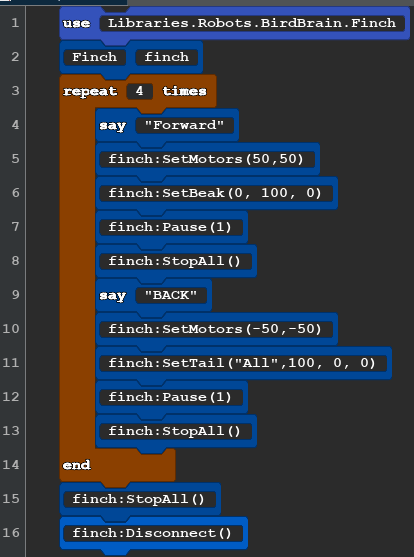
This code is the same as the past program except for 2 line. The say command is apart the basic Quorum program. The robot does not have the ability speak on it's own. But when you run the code your computer will speak. say "any words you want" any text you you in the quotemarks will be spoken. |
| OM3 Motor Circle | Text Code for Copy and Paste | Notes |
 |
use Libraries.Robots.BirdBrain.Finch Finch finch finch:SetMotors(1,50) finch:Pause(2.9) finch:StopAll() finch:Disconnect() |
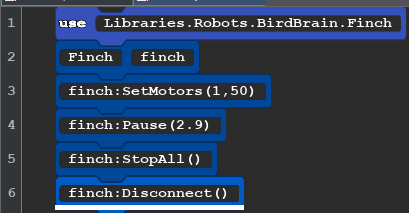
A Short code with a lot going on. What numbers would you need to change to make the robot go clockwise? can you make small or larger circles? This is a good activity to use your colored pens. |
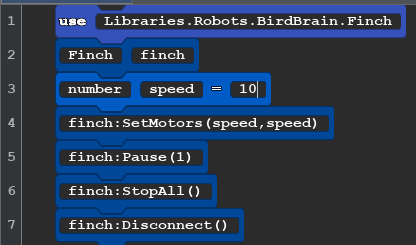
Lets find more about the speed of the robot. We are going to make a simple code, Make changes to the speed each time we run the program and like good scientest we will record the data we make and even create a Graph
| OM4 SPEED TEST Block Code | Text Code for Copy and Paste | Notes |
 |
use Libraries.Robots.BirdBrain.Finch Finch finch number speed=10 finch:SetMotors(speed,speed) finch:Pause(1) finch:StopAll() finch:Disconnect() |
Create a chart like the one below. 1 does not move the wheels. Do this 10, 20, all the way to 100. Using the pen will make it easy to then measure each line created. If you have a big paper you can use the line as a graph! |
Test Robot Data
| SetMotor | Distance Travels | seconds | Speed CM per second | expect from base of 7 |
| 1 | 0,0,0 no movement | 1 | 0 no movement | |
| 10 | 7,7,7 | 1 | 7cm/sec | 7 |
| 20 | 14,14,14 | 1 | 14cm/sec | 14 |
| 30 | 21,21,21 | 1 | 21cm/sec | 21 |
| 40 | 24,24,24 | 1 | 24cm/sec | 28 |
| 50 | 30,30,30 | 1 | 30cm/sec | 35 |
| 60 | 38,38,38 | 1 | 38cm/sec | 42 |
| 70 | 41,41,42 | 1 | 41cm/sec | 49 |
| 60 |
What does the data tell us. It the case of the test robot on a slick white board it does not achieve the expect speed starting At motor speed 40. My hypothesis is that at speeds above 30 there is a 4 unit of slippage or spinning of the wheels before they engage due to the slick surface. How could we test this hypothesis? Was your data different?
OM5 Spiral Challenge (Answer below)
Your task is to make your robot draw a spiral.
| OM5 Spiral Block Code | Text Code for Copy and Paste | Notes |
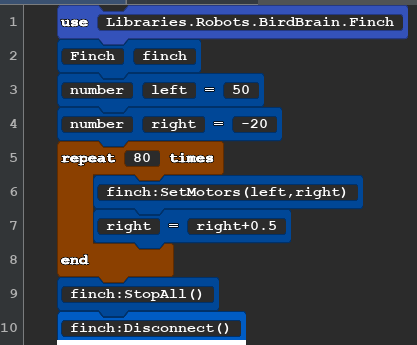 |
use Libraries.Robots.BirdBrain.Finch Finch finch number left = 50 number right = -20 repeat 80 times finch:SetMotors(left,right) right=right+0.5 end finch:StopAll() finch:Disconnect() |
There many ways to make your robot draw a spiral. Keep in mind:
Try adjusting the numbers to create small or larger spirals. |
OM6 Another way to move
There is another way move the robot called SetMove. It locks the wheels togather so they can only forward or backward.
finch:SetMove("forward", length, 50)
- text direction: The direction of movement ("forward" or "backward").
- number distance: The distance to travel in centimeters (Range: 0 to 500).
- number speed: The speed as a percent (Range: 0 to 100).
This if often used with the SetTurn command, length
finch:SetTurn("left",90,50)
- text direction: The direction of the turn ("right" or "left").
- number angle: The angle of the turn in degrees (Range: 0 to 360).
- number speed: The speed of the turn as a percent (Range: 0 to 100).
The following code will make a square spiral moving inward.
| OM6 Square Spiral Block Code | Text Code for Copy and Paste | Notes |
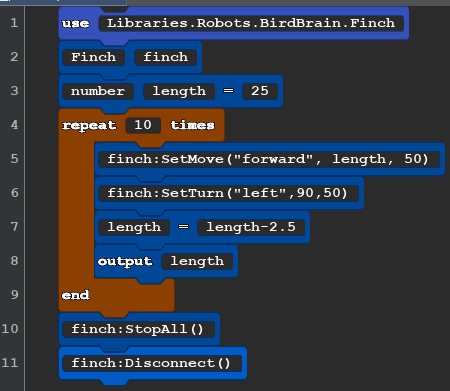 |
use Libraries.Robots.BirdBrain.Finch Finch finch number length =25 repeat 10 times finch:SetMove("forward", length, 50) finch:SetTurn("left",90,50) length=length-2.5 output length end finch:StopAll() finch:Disconnect() |
The output shows you the number that is the length in centimeters that the robot just moved in the consol on your computer. Can you make your robot make the same shape from small to large? |