This is a multi part lesson where the same code is reused with additions and a few subtractions. The tail is 4 led lights at the back of the robot just in front of the microbit display. It use RGB parameters that are used with the beak light and one more parameter that tell which of the 4 lights you want to use.
|
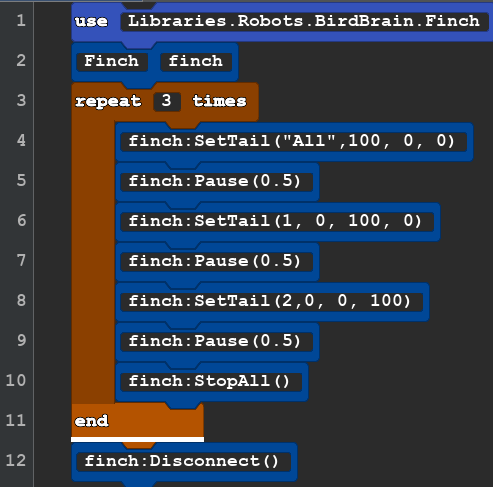
OLTail1 (copy Beak2 and paste it into a new project) |
use Libraries.Robots.BirdBrain.Finch Finch finch repeat 3 times finch:SetTail("All",100, 0, 0) finch:Pause(0.5) finch:SetTail(1, 0, 100, 0) finch:Pause(0.5) finch:SetTail(2,0, 0, 100) finch:Pause(0.5) finch:StopAll() end finch:Disconnect() |
You can change your code by replacing old code with just a few clicks. In the Edit Menu you will find Replace or use CONTROL H. If you copied the Beak=2 code in to your new project you would want to replace SetBeak with SetTail. Use the replace all choice and changes all of this at once. You need add a another parameter that tell the robot what light you want to use. There are 4 lights 1,2,3, and 4. This goes in the first spot. You can also use text "All" in the first spot to effect all 4 lights at the same time. Text must be inside of "parentheses marks". |
OL2Tail2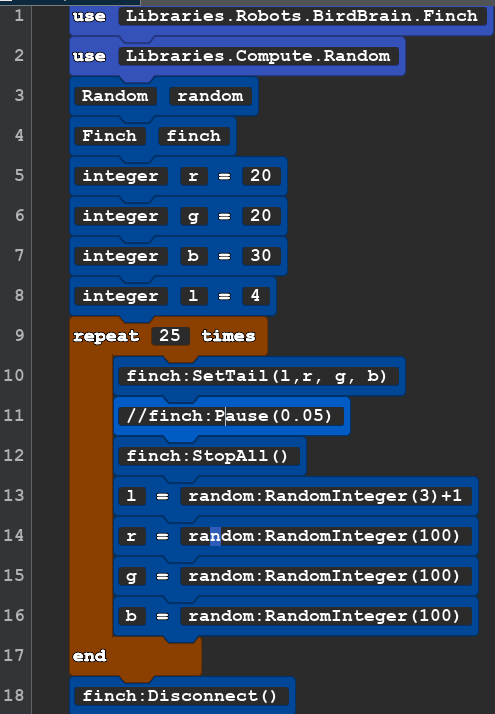 |
use Libraries.Robots.BirdBrain.Finch use Libraries.Compute.Random Random random Finch finch integer r=20 integer g=20 integer b =30 integer l=4 repeat 25 times finch:SetTail(l,r, g, b) //finch:Pause(0.05) finch:StopAll() l=random:RandomInteger(3)+1 r=random:RandomInteger(100) g=random:RandomInteger(100) b=random:RandomInteger(100) end finch:Disconnect() |
New: Variables, random and comments. the // (two slash marks) in line 11 mean to ignore this line. That is how we make a comment that does not effect the code, To make the flashing go slower just delete out the // and the pause will happen. |